I’m going to start this post with one of the boldest statements I’ve made in a long time: The way Salesforce Admins build apps has changed forever with the introduction of Builder Central. I’ll let that sink in for a moment.
Okay, the moment’s over. Let’s get moving!
I spent a few afternoons getting hands-on with Builder Central, and I honestly can’t remember the last time I was this captivated by a new Salesforce feature. And at this point, I’ve only scratched the surface, but the experience has completely changed how I think about building apps. In fact, I think we’re approaching a point where an Admin could have a requirements meeting in the morning, use Builder Central to build an MVP app over lunch, and show stakeholders a working version that afternoon. That’s a pretty exciting possibility, especially when you consider how much time traditionally goes into translating business requirements into something people can actually see and provide feedback on. Let me show you what I built, how I approached it, and why I think this is such a significant change for Salesforce Admins.
What is Builder Central?
Builder Central is an AI-powered, conversational workspace that enables Salesforce Admins to plan, build, preview, and deploy Salesforce solutions, including apps and agents, using plain language. In the beta, the focus is on getting you from an idea to a working app. You describe what you want to accomplish, review the plan Builder Central creates, and guide it as it builds custom objects, fields, Agentforce agents, flows, permission sets, and more. It’s designed to work alongside the declarative tools we already know, including Flow Builder and Lightning App Builder. The difference is that Builder Central can help coordinate work across multiple parts of Salesforce, so you don’t have to navigate between those tools and configure every component individually. You’re still making decisions about the solution, but the experience of getting from an idea to a working app is remarkably different. When Builder Central becomes generally available, it’s intended to become the single place where Admins can manage and configure their sandbox and production orgs, enable features, and build and deploy a broader range of solutions, while reviewing and approving changes along the way.
Spreadsheets beware!
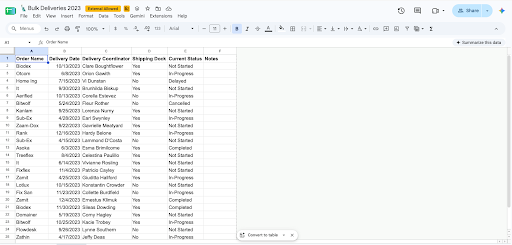
A few years ago, I created a demo using Salesforce Object Creator that I thought was pretty amazing at the time. If you remember Object Creator, it lets you upload a spreadsheet or connect a Google Sheet, then use that information to create a custom object and fields, and import the data. For Admins looking to get a jump-start on building an app, especially when replacing an existing spreadsheet process, it was an incredibly useful tool.
My demo was based on a scenario I suspect will sound familiar to many Admins. A company starts offering a new service, and someone creates a spreadsheet to manage it. As the service grows, more people rely on that spreadsheet, and it eventually becomes an important part of how the business operates. At some point, the Salesforce Admin discovers this process and realizes it should probably be managed in Salesforce instead. I’ve seen variations of this situation throughout my career, and it’s one of the reasons I loved demonstrating Object Creator.
When I started exploring Builder Central, I remembered that old demo and thought it would be the perfect candidate for testing. I already knew what the app needed to do; I had the original business scenario, and I’d built a version of it before. But instead of starting with a spreadsheet, I wanted to see what would happen if I simply described the application I needed.
I dug back through my presentation, found the original demo script, and turned it into this prompt:
Create an app called Bulk Delivery Management to replace a manual spreadsheet process and provide visibility to the Sales and Customer Service teams. Create a primary custom object called 'Bulk Delivery' with the following fields: 'Order Name' (Text), 'Delivery Coordinator' (Lookup to User), 'Has Shipping Dock' (Checkbox), 'Delivery Status' (Picklist), and 'Notes' (Long Text Area).

That was it. I didn't create a spreadsheet, set up the custom object, or start configuring fields in Object Manager. I gave Builder Central the business context, described the app I wanted, and let it start putting together a plan that I could review.
From requirements to a working app in 12 minutes
I recorded my experience because I think seeing Builder Central in action is much more useful than just describing what it does. The video below is sped up in places, particularly when Builder Central is deploying components, but the entire process took approximately 12 minutes in real time.
One of the first things that impressed me was that Builder Central didn’t start building immediately. It created a project plan outlining what it intended to build, giving me a chance to review the proposed components, understand their relationships, and decide whether the approach made sense before anything was built.
Once I approved the plan, Builder Central began creating the app in its own separate workspace, a kind of virtual environment where nothing is added to your Salesforce org until you decide to publish. After the initial build, it suggested additional steps to further customize the app, such as creating a list view. I accepted that suggestion, and Builder Central created the list view.
At this point, I was happy with the result, so I asked Builder Central to publish the app. For your own projects, you’d publish to a sandbox first, then move the changes through your normal release process.It handled the deployment and provided instructions for accessing what it had created, including assigning the appropriate permission set. Instead of navigating through Setup to find the permission set myself, I asked Builder Central to assign it to my user. A few moments later, I opened the App Launcher, found my new Bulk Delivery Management app, and started exploring it.
Now, was everything exactly how I wanted it? Not quite. When I went to create my first record, I realized I hadn’t told Builder Central to include all the fields on the record page. I opened Lightning App Builder, made the adjustment, saved and activated the page, and went back to my app. That’s a normal part of building something in Salesforce, and I actually appreciated being able to move between the conversational experience and the tools I already know.
What changes when you can build this quickly?
This is the part of my experience that I keep coming back to, because I think the implications go well beyond saving time in Setup. Think about how a typical requirements meeting goes. You sit down with a department, learn about the process they’re trying to improve, ask questions, and start thinking about how to model that process in Salesforce. Then you spend time building the solution and schedule another meeting to show stakeholders what you’ve created.
With Builder Central, I think we have an opportunity to dramatically shorten that cycle. Imagine finishing a requirements meeting in the morning and having a working prototype ready to show that afternoon. Instead of asking stakeholders to imagine how the app might work, you’re giving them something they can explore and react to. They can identify missing fields, think through scenarios they hadn’t considered, and ask questions that might never have come up during the initial meeting.
For me, that’s where Builder Central gets really interesting. It’s not simply about building an app in 12 minutes, although I certainly enjoyed that part. It’s about spending less time on the mechanics of building and more time collaborating with the people who will use it.
What does this mean for our Admin skills?
I think Builder Central creates an opportunity for Admins to spend more time on the decisions that make an app successful. In my demo, Builder Central handled much of the initial configuration, but I still reviewed the plan, evaluated the data model, and decided which suggestions to accept. When I opened the app and realized the record page needed some adjustments, my experience as an Admin helped me recognize what was missing and make those changes.
Getting to a working app faster doesn’t mean our responsibility for the solution changes. We still need to evaluate permissions, test automation, consider the user experience, and make sure what we’ve built meets the business requirements. But if Builder Central can help us spend less time configuring individual components, we can spend more time making sure we’re solving the right problem and delivering something useful more quickly to our users.
What should you do next?
I recommend getting hands-on with Builder Central in a sandbox. If you have an old app or business scenario that you’ve built before, try recreating it conversationally. That’s what made revisiting my Object Creator demo so useful. I already understood the requirements and how I’d approached the solution, so I could focus on what Builder Central was doing differently. You can also start with one of the suggested prompts on the Builder Central homepage. As you experiment, look at the project plan, review the components, and ask Builder Central to make changes. And because it’s currently in beta, be sure to familiarize yourself with its limitations.
There’s something about this experience that reminds me of when I first became an Admin. I’d discover a new capability, think about a business problem it might solve, and start building just to see if I could make it work. That curiosity is one of the things I’ve always loved about Salesforce, and time with Builder Central brought a lot of that excitement back. I still have plenty to explore and I want you to give it a try and share what you discover too.
Internal teams often reach out to admins with the same types of questions, like how to reset a password, where to check their paid time off balance, or how to find a policy. These requests may be simple, but they take time and often build up during the day. Agentforce can help by automatically handling […]
Get started with Agentforce Vibes Agentforce Vibes might seem like a strange starting point for the average Salesforce Admin, but it can be a very powerful tool. And it’s becoming more and more powerful as time goes on. To understand its potential for admins, it helps to start with the basics. When you open Vibes […]
Another year, another incredible Dreamforce- powered by you, amplified by agents! From connecting with other builders to getting sneak peeks of upcoming product releases, we are leaving energized and ready to build. Some of this year’s biggest moments came from admins bringing the Agentic Enterprise to life in the Admin Keynote. The keynote featured Radiant […]