Security Is Your Superpower — Let’s Make It Easier!
As admins we’ve all been there: navigating dozens of Setup pages, juggling permissions, auditing connected apps, and reviewing IP ranges to keep our orgs locked down. Security isn’t just a checkbox for us; it’s a core responsibility we carry Every. Single. Day.
With the evolution of agentic AI comes the rise of more sophisticated, more convincing, and more motivated security threats. The landscape is shifting fast, which means our vigilance has to shift with it.
If you’ve been in the Salesforce ecosystem for a while, you’ve heard us say it: At Salesforce, Trust is our #1 value. And we mean it! The recent announcement of Security Center Essentials is proof. With Security Center Essentials, admins now have more tools than ever to protect their orgs. And it’s free.
Meet Security Center Essentials: Your free org security dashboard
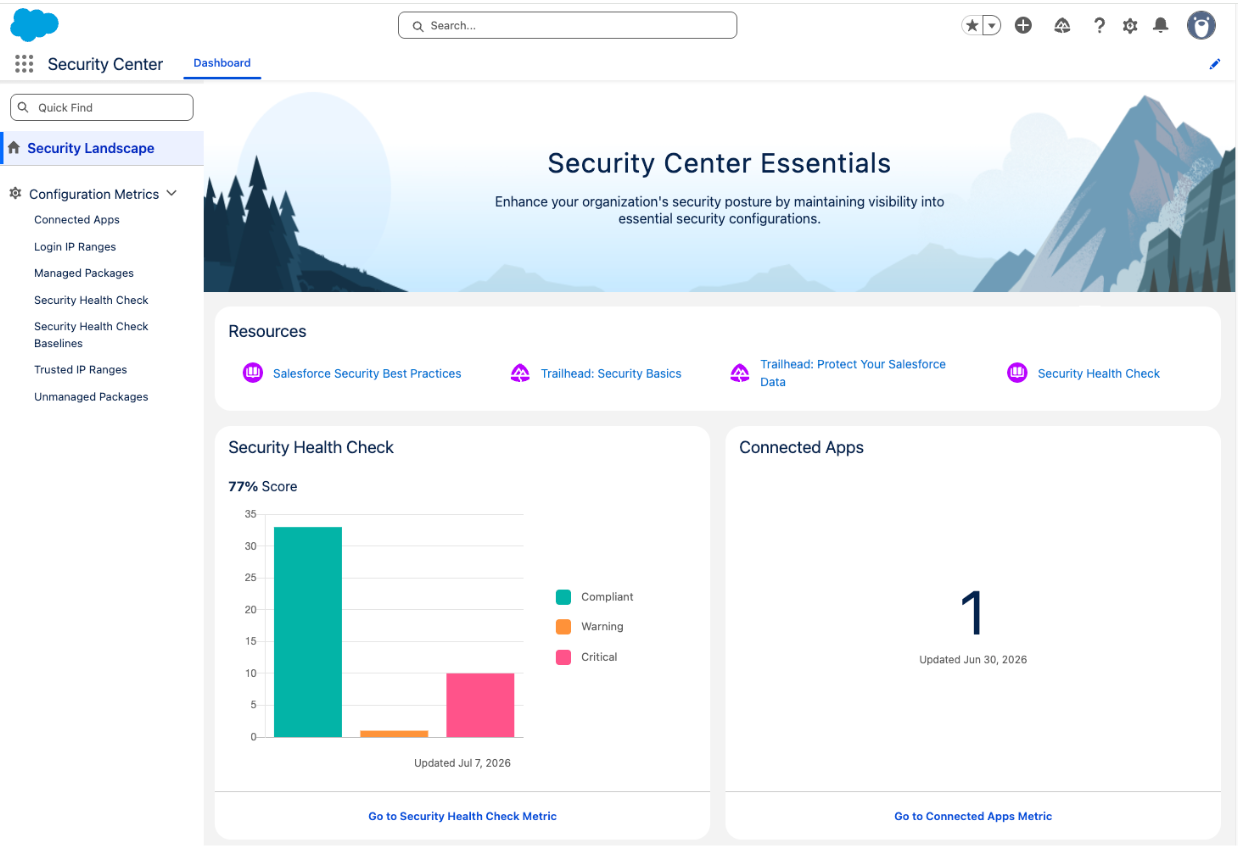
Security Center Essentials is a centralized, no-cost dashboard that provides immediate visibility into your org’s security posture. No more jumping between Setup pages or manually piecing together a picture of your org’s health. It’s all right there. This dashboard offers a snapshot of critical security metrics for all admins. Some key features include:
- Health Check Score: Track your org’s health against the standard Salesforce baseline or a custom baseline you define. Measure your security posture against the standards that actually matter to your organization.
- 30-Day Metric Retention: Watch your security posture over time and monitor both improvements and regressions. It provides a better way to track and investigate security trends in your org, because security isn’t one-and-done — it’s a constant effort.
- Core Metrics at a Glance: Quickly review security features such as connected apps, installed packages, login IP ranges, and trusted IP ranges — all in one place.
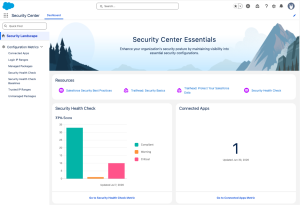
Having these features in a single dashboard saves admins hours of audit time, but the value goes beyond convenience. Security Center Essentials helps you shift from reactive to proactive — so you catch that unapproved connected app a user installed 2 years ago before it becomes a problem. And speaking of value, use the 30-day metric retention to provide tangible proof to your leadership team that you’re hardening your organization’s security posture over time and protecting its most valuable asset: your data.
Need more? The full Security Center has you covered
If you get started with Security Center Essentials and determine that you have advanced reporting needs, you can still easily upgrade Security Center for more metrics, multi-org monitoring, and proactive alerting.
With the full version of Security Center, you get a centralized view of every org you manage, with security metrics consolidated across all connected orgs in one place. You can customize alerts on your security metrics and define your own security policies to match your organization’s standards. You also get extended historical data storage, so you can maintain long-term audit trails and meet compliance requirements — well beyond the 30-day metric history available in Essentials. If you’re managing an enterprise multi-org environment and need to centralize oversight, enforce unified security policies across all tenants, and retain compliance data long term, the full version of Security Center is built for you. And to learn how Security Center uses Agentforce, read about its glow up.
Three quick wins to act on today
The good news keeps coming. Turning on Security Center Essentials is easy, and you don’t need a support case. Just assign the View Security Center Pages permission and you’re in. Access it directly through the App Launcher or from Setup.
Here are some quick wins you can take advantage of.
- Check your org’s Health Check Score: Compare your org’s security to either the Salesforce Baseline Standard or your own Custom Baseline to surface critical security gaps. Use this to prioritize your internal security initiatives and to take action right away.
- Audit your connected apps: Drill into apps to see who installed what, and use this as a means to clean up unnecessary integrations to keep your data secure by reducing your org’s attack surface.
- Review your IP restrictions: Check in on your trusted IP ranges to make sure they align with the realities of how your team works today (remote, in-office, and hybrid work policies).
If you have questions or need support, Security Center Essentials has quick links to Salesforce security best practices and Trailhead content to continue learning and implementing recommended approaches.
Start using Security Center Essentials
It sounds too good to be true, but this is real life, admins. It isn’t a trial, limited preview, or hidden patch. Security Center Essentials is sitting in your org right now, waiting for you to use it. So get started: Log in to your org, assign the permission to yourself, and get proactive about security.