If you read our Test for Outcomes with Flow Testing Upgrades post, then you’re familiar with creating tests that will determine if the flow executed — not just without error, but having reached the right conclusion based on data. Using data to validate outcomes mirrors what developers are used to doing with code via unit testing.
There’s another concept we can borrow from traditional development: creating dedicated test data that can be used over and over to maximize test outcomes. In this blog, we’ll explore how controlling the data that starts the flow helps you, the admin, add a significant level of control and predictability to your flow tests.
Why consider dedicated test data?
Of course, you can re-use data that’s already in the org. And in many cases, this will be sufficient, especially if you’re testing within an environment that mirrors your production data, like a full data sandbox. However, consider the following situations.
- Your test relies on related records with specific data in specific fields. You’ve built your flow test around that response, but after deployment the record you’ve selected to test either gets deleted or updated by a user or automated process. Now the outcome of your flow test may be impacted if a replacement isn’t found.
- You built your flow test in a data-rich sandbox, but a new version of the flow is created in a data-dry sandbox or a Developer Edition with a different data set. Again, this could disrupt or break your existing flow test.
In these scenarios, instead of relying on the shape of a specific org’s data (in other words, the data that exists in the org where the test runs), what if you could replicate the same set of test data, tailored to your needs, for every flow test?
That’s where admins can borrow the concept of a dedicated suite of test data to test against. It puts you in control of the data you need and guarantees access despite where that data is being used.
Design your dedicated test data set
There are a couple of key things to know about using dedicated test data. First, it’s generated by the system and not the user (in this case, Apex, but we’ll get to that next). Second, the data is ephemeral, meaning it only exists for the time required to run the test and is never actually written to the data layer.
This means you can create, update, and delete records to define your use cases without worrying about impacting any real data, and the data will work the same.
Note: If you have a flow test using org data instead of Apex test data, while it might rely on existing records, all changes are rolled back and do not impact your data layer. The difference is that the records need to exist to be able to run the tests.
Creating a proper invocable Apex method that will 1) work correctly in Flow and 2) not add unnecessary code into your org can be daunting, so it’s time to bring your developers to the table to get that test data set up and running.
What you need to bring to the data is an understanding of the data that you want to use to test, so that you can give that to the developer as required.
When discussing adding this functionality to your flow, ask yourself:
- What is the overall summary of this flow? What is its purpose, and what solution is it trying to solve?
- Which records are important to this flow? What is needed to kick the flow off, and which related records will need to be found or impacted?
- Which fields are important to this flow? What are the decision actions being triggered by? What kind of fields are you expecting to change or find?
- What depth of data do you need? Remember that one of the strengths of a Test Setup class is that you have a blank page to draw on. If it’s important to have 500 records instead of 5, let the developer know; in Apex it can be incredibly easy to go from a small data set to a large one.
Bring in the developer
Equipped with your responses, you can convert these requirements for your test data into a request for developers. Your teams may have existing docs, workflows, or other request methods, but some fundamental things include:
- That you’re requesting an Apex class to generate data to test a flow; this has a few distinctions from what a normal test data class might include.
- Like most test classes, it will need to be annotated as an isTest class. An annotation in Apex is a way of declaring it has specific functionality; in this case that it operates within a test layer and not the normal system functionality.
- It will need a method annotated as testSetup. This labels where Flow can find the code to generate the data.
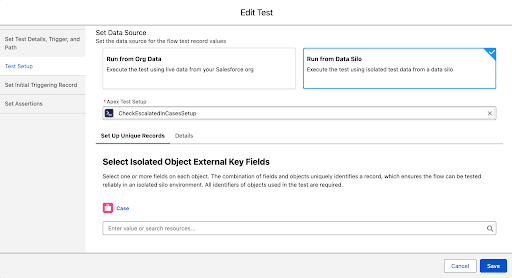
- The class must be in the global scope. This is a visibility thing in Apex, with global being the most visible. Since Flow and Apex aren’t exactly close neighbors, global is needed to make it available in the flow testing UI where you declare which Apex class you’re using (see below).
- Which flow you’re referencing and a brief summary of its purpose
- What kind of record and fields you need to initiate the test
- What kind of related record and fields you need to complete the flow
Pro Tip: If you have access to an AI tool like Claude, ChatGPT, or Gemini, use it to organize these questions and get recommendations for format and additional information (like that the class must be global).
Once the class is created and deployed to your org, you can add it under the Test Setup tab of your flow test.
Think long term
Using test data sets that create the data needed to run the test, rather than relying on data in the org, gives you a portable, predictable set of records that will behave exactly the same across different environments.
Another advantage of this is that once the Apex is created, these methods become a reusable set of classes that can be run over and over again. Using data generated specifically for the test, instead of relying on a set of transactions that ultimately gets rolled back, is a faster and more efficient way to execute your tests.
Finally, since the data is all based on code, if your needs change, the code can be updated rather than having to update your actual data layer to meet your needs. While this does require Apex, it’s similar to partnering with developers using invocable methods to execute edge cases where code can help finish the solution. Need more or less data? These can be small code changes in an artificial set of test data.
Where to start
Start small, with simpler flows you can easily have a comprehensive feel for what kind of data is required. This will validate the approach of moving away from org data, and get the wheels moving when it comes to working with developers on the requirements for the code. It will also give developers a starting point to determine how best to meet future requests for flow test data.