You shipped an agent. It’s working — and now everyone wants a piece of it. “Can it also handle billing?” “What about account inquiries?” “Can it do onboarding too?” Before long, your focused agent is being asked to do everything at once, and that’s where things get messy. Multi-agent orchestration is how you fix that: a coordinated team of specialized agents, each owning their lane, with one Super Agent routing every request to the right place. From your customer’s perspective, it’s one seamless conversation — they never see the handoffs.
If you’ve ever built an agent, you know the basic structure:
- Subagents (formerly known as topics) define what an agent can help with.
- Actions give the agent the ability to do things.
- The reasoning engine figures out which subagent and action(s) to invoke based on what the ask is.
This works well, up to a point. When one agent is responsible for too many domains, the cracks start to show. Subagents overlap. Instructions get long and contradictory. The reasoning engine starts to make surprising choices because there’s too much competing context to sort through. Outputs become inconsistent and debugging becomes a nightmare.
With multi-agent orchestration, each specialized agent owns one domain and does it well. A Super Agent serves as the single entry point, routing every conversation to the right specialist. That’s the foundation of Multi-Agent Orchestration, multiple agents working together within one Salesforce org, coordinated by a Super Agent.
One agent or many?
Deciding between a single agent equipped with multiple subagents or a true multi-agent orchestration is a critical decision. Here’s a quick guide on how to determine the best design.
When to use a single agent with subagents
Stick to a single agent when your workflow is straightforward, stays within a single domain, and uses shared data access.
Take an HR FAQ Agent as an example. Your HR team gets the same questions every day: “How many vacation days do I have left?” “Where do I find the parental leave policy?” “How do I update my direct deposit?” Build one agent with subagents covering Benefits, Payroll, and Time Off. All three subagents pull from the same HR system, follow the same verification flow, and belong to the same domain.
The Breaking Point: As complexity scales, single agents eventually hit three walls.
- Boundary Limits. Single agents cannot cross architectural walls to access data or permissions in different Salesforce orgs. If your HR FAQ Agent lives in your Agentforce Cloud (formerly known as Service Cloud) org, but payroll data lives in a separate Finance org, the agent simply can’t reach it. You end up with an agent that has to tell customers, “I can’t help with that.”
- Context Overload. The more domains you add, the longer and more complex your instructions become. At a certain point, the reasoning engine can’t hold it all cleanly. You start seeing it skip guardrails you wrote explicitly, route conversations to the wrong subagent, or apply billing logic to a shipping question. For example, you started with Benefits, Payroll, and Time Off subagents. Then IT got added, and then Facilities. Now your instructions are hundreds of lines long and the reasoning engine is struggling to hold it all cleanly. Employees start getting routed to the wrong subagent. The instructions didn’t get worse, the context window just got too crowded.
- Specialization Collapse. A “jack-of-all-trades” agent loses precision and misapplies logic. An employee types, “I have a question about my account.” Is that a payroll question, a benefits question, or perhaps an IT access question? Your agent doesn’t know, so it guesses. The more domains you stack onto one agent, the less reliably it applies logic to any of them.
Six months after launching that HR FAQ Agent, IT wants in: “Can it also handle password resets and software requests?” Then, Facilities: “Can it book conference rooms too?” Now you have one agent straddling HR data, IT systems, and facilities management. That’s three different domains, three different data sources, three completely different sets of logic. That’s the breaking point.
When to use one Super Agent routing to multiple agents
Use Multi-Agent Orchestration when your workflows span multiple domains within a single Salesforce org, but users still expect one unified conversational front door.
Instead of overloading the HR agent, build an Employee Services Super Agent. Employees still go to one place to have a single conversation. But behind the scenes, the Super Agent listens and routes to the appropriate Connected Subagent.
- HR Agent handles benefits, payroll, and time off.
- IT Support Agent handles password resets, hardware requests, and software access.
- Facilities Agent handles room bookings and equipment requests.
Each agent specialist owns its domain, its data, and its logic. The Super Agent doesn’t know anything about parental leave or VPN access — it just knows which agent does.
How does the Super Agent and Connected Subagent model work?
When a user sends a message, the Super Agent’s reasoning engine reads the request and compares it against the descriptions of each Connected Subagent (remember that subagents were previously “topics”). It picks the best match, passes the relevant context, such as the user’s identity, a case number, or an order ID, and hands the conversation off to the Connected Subagent. The Connected Subagent runs its own reasoning, executes its actions, and returns the result. The Super Agent takes back control and responds to the user. From the user’s side, it’s one continuous conversation — they never see the handoff.
In the Employee Services example, when an employee types, “I can’t log in to my laptop,” the Super Agent reads the request, matches it to the IT Support Agent (Connected Subagent) based on its description, passes the employee’s identity and the details of their message, and routes the conversation over. The IT Support Agent runs its own logic, checks the right systems, and responds. If that same employee then asks, “How many vacation days do I have left?” in the same conversation, the Super Agent routes the next request to the HR Agent instead. We use the same front door and route to the right agent specialist every time.
Ask three questions to break down your tasks effectively:
- Where does the work naturally break? Draw boundaries exactly where a human worker would pause and hand off a task.
- Is the data completely disconnected? If two workflows pull from isolated systems, they belong in separate agents.
- Where should failures be isolated? If one process crashes, the other must survive.
The quick test: If you can’t describe a subagent’s exact purpose in one sentence without using the word “and,” it needs to be split further.
What makes a Connected Subagent different from an agent’s subagents?
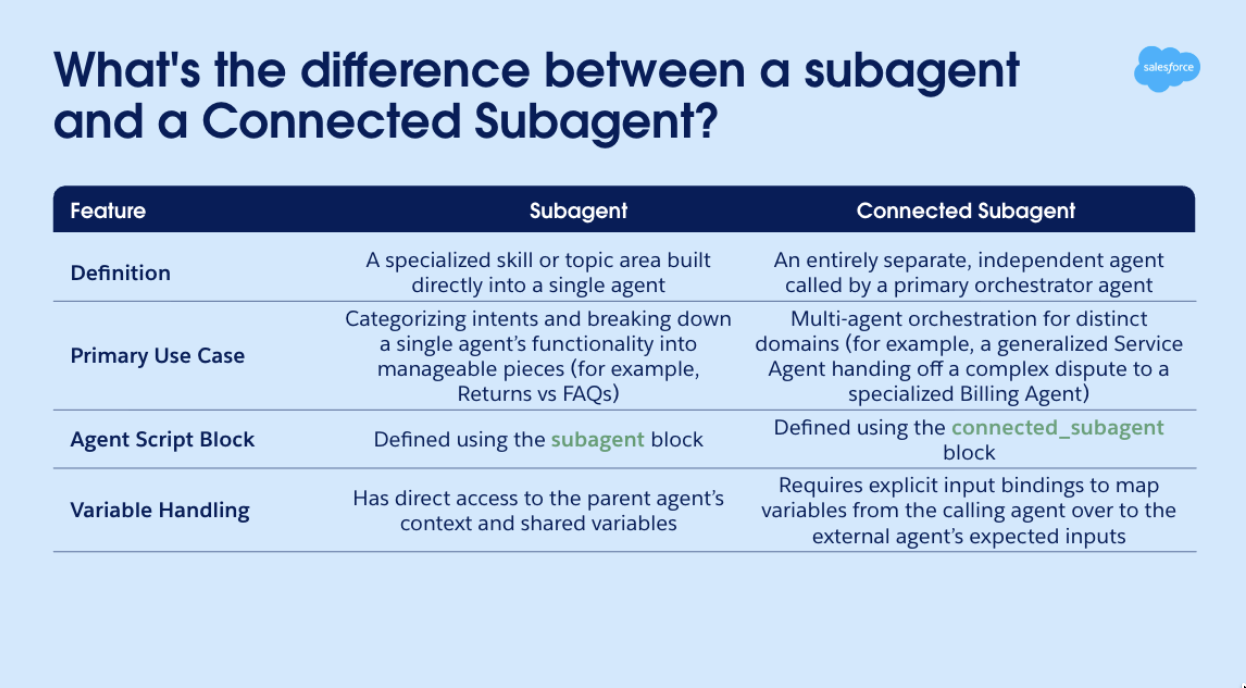
While an agent’s subagents act as functional building blocks inside a single agent, a Connected Subagent represents an entirely separate agent that your main agent delegates tasks to.
Table showing differences between a subagent and Connected Subagent.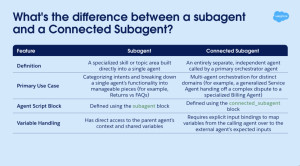 Before you build, it’s worth being clear on which model you’re working with. Let’s recap.
Agent subagents
Agent subagents (previously “agent topics”) are logical groupings of instructions, actions, and conditions contained within a single agent.
For example, a single Customer Service Agent might have distinct standard subagents for “Order Management”, “General FAQ”, and “Escalations”. When your customer asks a question, the agent’s reasoning engine evaluates the intent and routes the conversation to the most relevant subagent to complete the task.
Connected Subagents
Connected Subagents are what make multi-agent orchestration actually work.
Instead of routing your customer to a specific skill within the same agent, a Connected Subagent allows your primary agent (Super Agent or the orchestrator) to delegate a task to a completely different agent operating in your Salesforce org. When called, the main agent passes specific input variables over to the external agent, waits while the external agent runs its own reasoning and logic, and then takes back control once the external agent is finished.
Connected Subagents and agent subagents are different models and different orchestrations. If you’re building a Multi-Agent Orchestration, you’re working with Connected Subagents.
Here are a couple things to be aware of when using Multi-Agent Orchestration (Beta).
- We recommend no more than 7 connected subagents per orchestrator agent.
- You can use the following agent type combinations for orchestrator agents and Connected Subagents:
- ASA (Agentforce Service Agent) orchestrator agent with ASA Connected Subagents
- AEA (Agentforce Employee Agent) orchestrator agent with AEA Connected Subagents
- AEA orchestrator agent with ASA Connected Subagents
Read the Multi-Agent Orchestration Help article for more considerations and limitations while in beta.
One rule to keep top of mind as you design: Connected Subagents respond — they do not route or orchestrate. If you ever find one trying to call another Connected Subagent, that’s a signal to revisit your architecture. Don’t patch the instructions.
What’s next
You now know when to stick with a single agent and when it’s time to use Multi-Agent Orchestration.
Ready to start putting this in action? Spin up a sandbox or a personal Agentforce Developer org and start mapping your use cases. Look for the natural breaks and places where a human would pause and hand off to someone else. Those are your agent boundaries.
Resources