We’ve heard it before: Security is a team sport. In fact, it’s a shared responsibility between Salesforce and its customers. Salesforce provides the foundational platform security, meaning the things going on behind the scenes. As admins, we configure the rest. But security isn’t stagnant. We can’t just set it and forget it. Security is constantly evolving, and as we move into the agentic era, we are facing new threats. To address them, Salesforce is launching enhancements to help admins build a self-protecting org, and Salesforce Guardian plays a big role.
Here’s how Salesforce Guardian is structured, the new AIforce security enhancements, and best practices for putting them to work in our orgs.
The basics of Salesforce security architecture
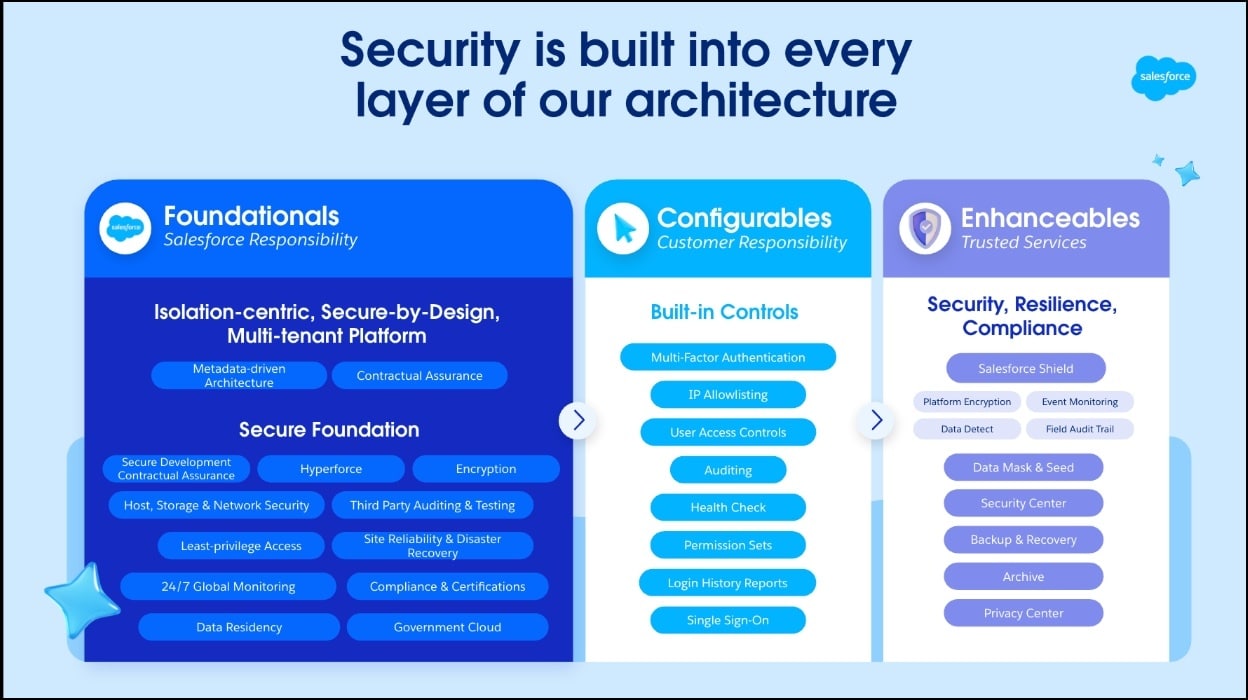
I mentioned that security is a partnership between Salesforce and customers, and this comes to life in the security architecture, which is grouped into 3 different layers:
The Foundationals are the built-in 24/7 security layer. Salesforce maintains these, and as admins we don’t need to worry about these baseline security features; we can be confident that the secure-by-design foundation is in place.
The Configurables are our security domain, the tools included in our Salesforce subscription that we set up and fine-tune. This includes built-in controls such as multi-factor authentication, IP allowlisting, user access controls, permission sets, health check, and more!
The Enhanceables are a suite of enterprise-grade security products and governance tools that organizations can implement. Salesforce Guardian represents this portfolio of trusted, agentic security, privacy, and data protection products.
Salesforce Guardian is built on three pillars
Data Security includes products such as Shield and Security Center. Shield provides encryption, event monitoring, and audit trails. Security Center gives us one place to keep tabs on our security posture across orgs.
Data Compliance includes products such as Privacy Center and Data Mask & Seed. Privacy Center helps us manage retention and privacy rights requests. Data Mask & Seed protects sensitive data in sandboxes so our teams can build and test safely.
Data Resilience includes products such as Backup & Recover and Archive. Backup & Recover helps us restore quickly if our data is lost or corrupted. Archive keeps our org lean while we retain what we need for compliance.
Together, these pillars let us move fast on AI and stay protected.
When we think about how AIforce and Salesforce Guardian work together, AIforce provides the interface and execution layer; Salesforce Guardian wraps it in protective security controls. As we innovate faster, especially with AI advancements and agents, the question is how to do it without putting our valuable data at risk. That’s what Salesforce Guardian is for. It helps us innovate at scale while keeping data secure, compliant, and resilient. Now that we’ve covered a little groundwork on Salesforce Guardian as a whole, let’s dive into some of the AIforce security enhancements included in these Salesforce Guardian products.
Drive AI governance with Compliance Agent
Compliance requirements are getting more complex, and most teams handle them manually. Compliance Agent is part of Privacy Center and helps automate that work by proactively detecting data privacy risks and helping admins stay ahead of threats through a simple guided experience. It scans our core metadata to set a compliance baseline and gives us a compliance score tied to our org’s regulatory goals. This is awesome because it accelerates remediation and helps us shore up noncompliance with actionable plans. But don’t take my word for it; check out this quick demo video from the Dreamforce Admin Keynote to see Compliance Agent in action.
Because autonomous agents rely on Retrieval-Augmented Generation (RAG) to evaluate actions, enforce policies, and audit transactions, classifying grounding data is critical to the Compliance Agent’s success. When grounding data is unclassified, the agent is unable to distinguish between public and restricted data (and data categories). Take the time to classify data points and distinguish between governance categories such as GDPR, HIPAA, and other forms of PII.
Connect security signals together with Security Mesh
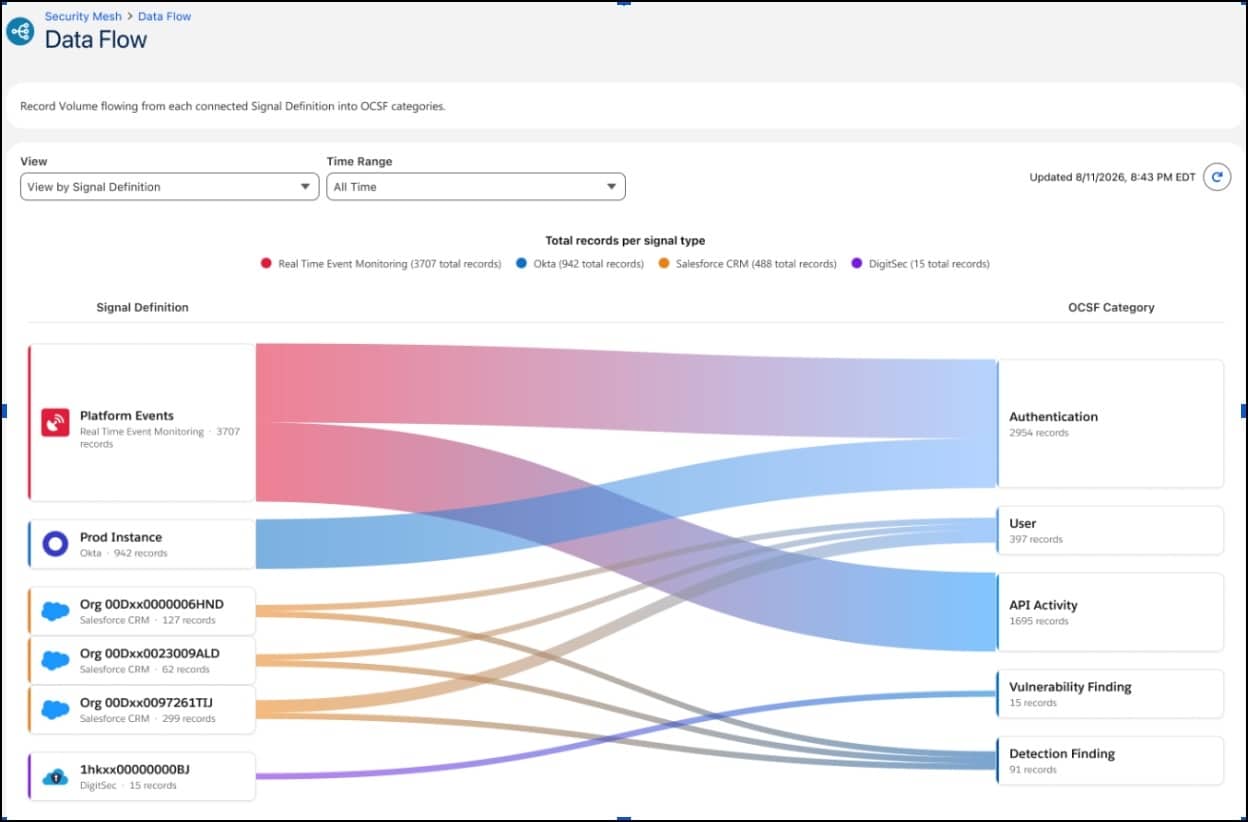
Most security teams have signals scattered across lots of tools – oftentimes lots of disconnected tools. Security Mesh, part of Security Center, brings these tools together. It unifies security signals from partners like Okta and CrowdStrike. Because the data is normalized in one place, we now get a single view and richer investigations, including detections like Impossible Travel. This allows us to see more and spend less time stitching tools together.
Govern Agent Connections to External MCP Servers
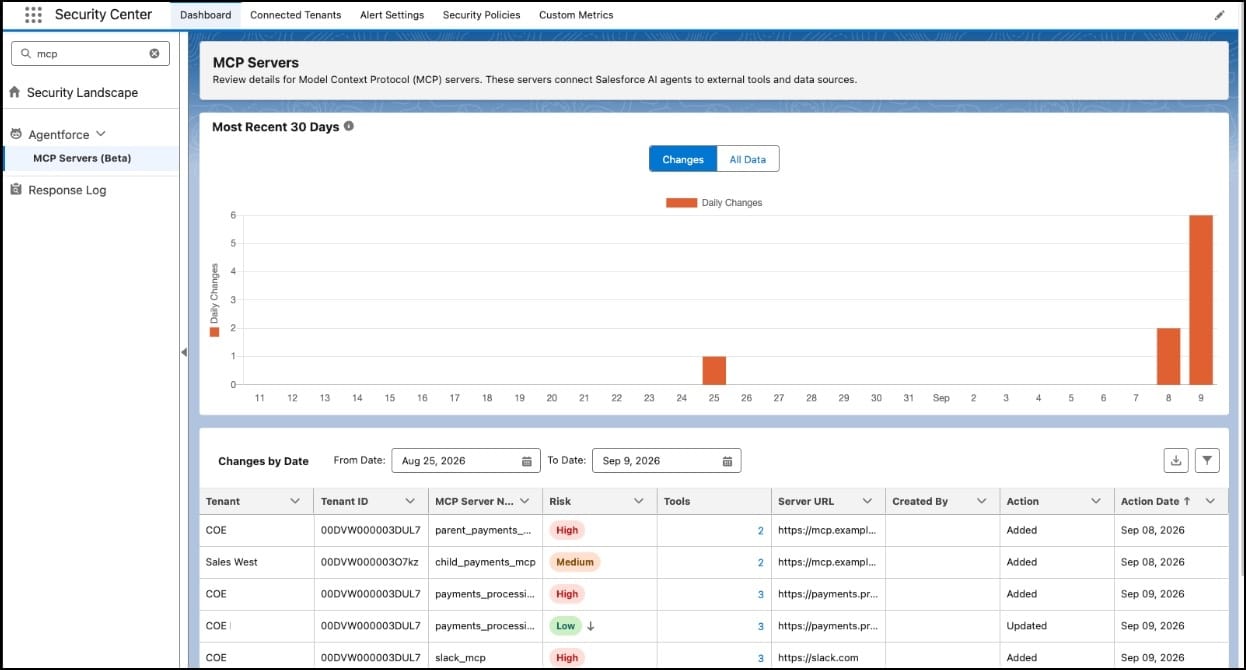
Currently in beta, Model Context Protocol (MCP) Security is critical as admin responsibilities expand, reducing agentic risk and governing how AI clients, agents, and external systems interface with Salesforce-hosted and external MCP servers. MCP Security, part of Security Center, scans every server at registration and surfaces Low, Medium, and High risk scores in Security Center so admins can block threats before they reach our agents.
From reactive to proactive: Implement best practices
Implementing new AIforce Security Controls isn’t just flipping a switch and adding new products to our orgs and assigning permissions to our users. Creating an implementation plan that creates space to shift from reactive to proactive requires considering a few best practices. Let’s talk through them!
Adopt a Zero Trust framework and enforce the Principle of Least Privilege across the organization for both human and agent users. The Principle of Least Privilege ensures that all of our users have the access necessary to do their jobs, but nothing more. This will help build a self-protecting org and allow AIforce enhancements to properly identify and recommend actions on any risks in the org.
Salesforce Guardian offers many features that can instantly block or detect suspicious behavior, but as admins we want both insight and escalation controls to maintain defensible governance. Take time to establish escalation for high-risk transactions. This gives your organization a clear path to mitigate the impact of false positives, contain edge cases, and meet any regulatory “Human-in-the-Loop” mandates your business may need to follow.
Conclusion
Security has always been a partnership, and AI’s rapid innovation has raised the stakes. As autonomous agents take on more work for users, the surface area that Salesforce admins need to protect grows. Salesforce Guardian closes that gap. Its three pillars—data security, data compliance, and data resilience—surround AIforce’s execution layer with the controls needed to keep our data secure, compliant, and recoverable as we continue to innovate with AI. The new security enhancement products put practical tools behind that promise. Compliance Agent automates the privacy work most teams still do by hand, Security Mesh unifies scattered security signals into one view, and MCP Security helps govern how agents and external systems interface with our orgs.
With these enhancements, we can implement security best practices and help our teams thrive in the agentic era. We can move fast and stay protected because we’ve built security at the core of our organization. You can get started with these best practices today and try out the MCP Security beta.
In September, Salesforce announced AIforce, its strategy for bringing Salesforce to any AI model, agent, or interface where your teams already work. To see where it fits, picture the Salesforce platform as four layers. Data 360 brings your data together. Customer 360 holds your workflows, data models, and business logic. Agentforce is where agents get […]
Admins are managing more requests than ever, and let’s be honest, it’s getting harder to keep pace. Turning business ideas into production-ready apps and agents takes time. You’re constantly stitching together features, navigating complex data models, and toggling between Setup and different builders. At the end of the day, it means that you can’t keep […]
AIforce expands possibilities for admins Salesforce Admins are adaptable. Over the years, we’ve transitioned through many technology shifts. Look at automation– we went from workflow rules to Process Builder to becoming full-fledged-flowantics. When AI entered our scope, we quickly got up to speed on Prompt Builder and Agentforce, bringing AI into the flow of work, […]