User management is a huge responsibility to ensure the right people (both internal and external) have the right access. This includes creating and deactivating users, managing licenses, providing login access, understanding profiles, permission sets, and permission set groups, and troubleshooting user visibility issues. In fact, troubleshooting user management is something that admins everywhere report takes up the most time in their week!
Historically, profiles handled a lot of user access in Salesforce. But in the past few years, Salesforce has moved to a permission set led model where profiles provide baseline settings, and permission sets and permission set groups handle most user access. What does that mean for admins everywhere who are updating their orgs to follow best practices? It’s rare that we get to start fresh in an empty org, building our profiles and permissions from scratch. I’m not here to walk you through auditing and updating your security model, but rather to demystify user management and help you choose the best tool for your own security model.
Profiles
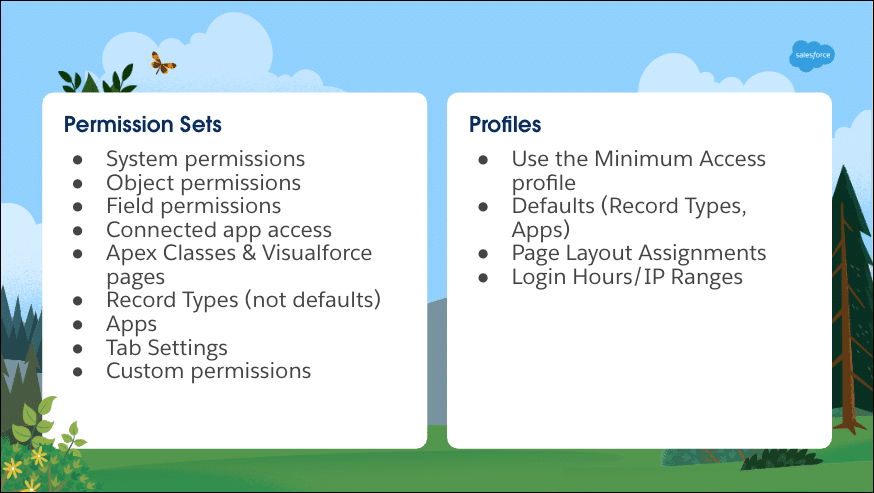
Every user must have a profile, and it defines the baseline configuration for a user. When we think about the minimum access our user needs, this includes functionality such as
- Login IP ranges
- Login hours
- Default apps and record types
- Page layout assignments
- Baseline permissions
Standard Profiles: Salesforce offers easy-to-use profiles that apply to most organizations regardless of industry. Edits an admin can make to standard profiles are minimal, and they can’t be renamed or cloned for differing uses.
Custom Profiles: When Standard Profiles don’t offer the baseline configuration needed, admins can create custom profiles that can be cloned, renamed, and deleted as necessary.
Think of profiles as the way to set minimum access for your users. They are the most restrictive user management tool, and we can open up that access using other features such as Permission Sets. In fact, for maximum restriction, you can use the Minimum Access – Salesforce profile as a baseline.
Permission Sets
Permission Sets grant additional access beyond what’s defined in the minimum access profile. This makes an admin’s life easier, because you can apply permission sets to users based on the job they need to do versus their specific role, saving you from creating a mountain of profiles and instead allowing for maximum reusability. Permission sets should control:
- Object permissions
- Field-level security
- System permissions
- Access to connected applications and Apex classes
- Custom permissions
- Tab settings
- Record Types (outside of the default)
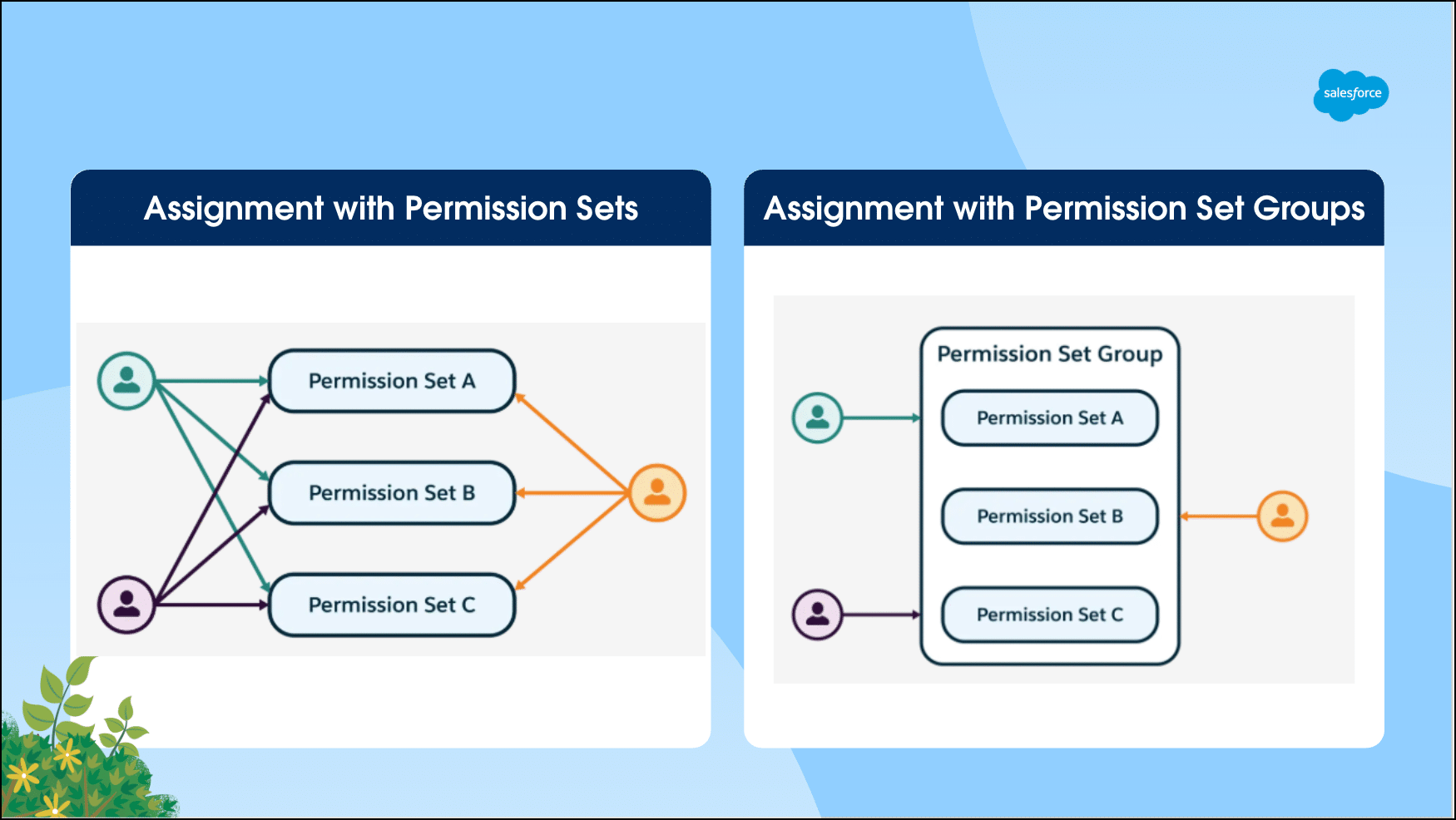
With permission sets, admins can grant access based on capabilities or tasks a user needs to perform, rather than creating a new profile each time. It’s also important to know that a user can have multiple permission sets assigned, unlike profiles where they can only have one.
Pro tip: Create multiple permission sets rather than one massive permission set with multiple permissions included. Your label can be descriptive of what the permission gives access to, and then the individual permission sets can be added to a permission set group if you need them all granted to a specific persona.
Permission Set Groups
Permission Set Groups are where admins can bundle together multiple permission sets and assign them to users as a package. You might be wondering, “If I can just assign multiple permission sets to a user, why would I want to use groups?” In many cases you might have multiple permission sets you assign to the majority of your users, so assigning a single group is more efficient.
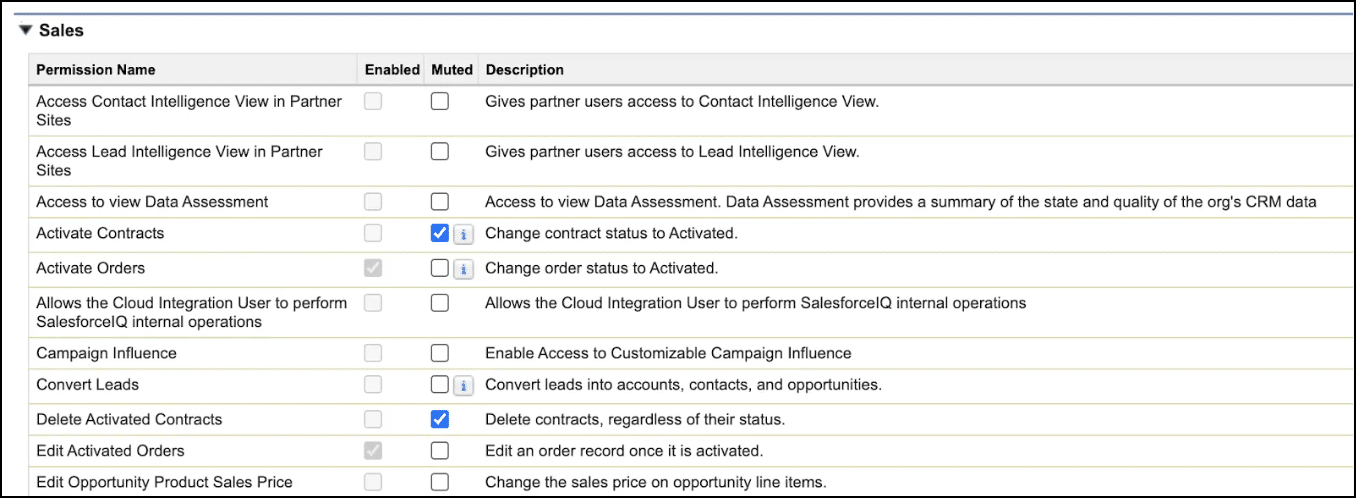
The secret power of permission set groups is that you can mute permissions. If there’s a permission (or a few) within that group that your user doesn’t need, you can remove specific access without needing to adjust the underlying permission sets. Pretty cool, huh? This makes it much easier for admins to maintain user permissions.
Create your access strategy
Now that you have the basics, you can apply them to your own org to follow a permission set led security model that’s more scalable. We have some great posts on admin.salesforce.com to guide you on best practices and designing a permission strategy based on the personas present in your business. By shifting your mindset from profiles defining access to permission sets layering access, you’ll build a system that’s easier to maintain, easier to audit, and easier to adapt as your org grows.
Resources