Salesforce has launched the new Agentforce Builder, a brand-new experience for building agents powered by an enhanced version of the Atlas Reasoning Engine. For admins, this new builder represents a meaningful shift in how much control, clarity, and confidence you have when designing agent behavior.
Previously, Atlas had a focus on retrieving and interpreting prompts. Based on the nature of the prompt, it would then determine the flow of custom actions in order to execute a solution.
The new builder uses a graph-based engine, which means it’s able to have that flow defined, controlled, and previewed. The flow portions and conversational portions can be customized distinct from each other, allowing for more predictable and deterministic outcomes. This is also known as hybrid reasoning.
While the fundamentals of Agentforce haven’t changed, how admins build and control agents has.
Agents are still:
- Protected by the Einstein Trust Layer
- Designed to deliver autonomous, conversational experiences
- Driven by topics, actions, and instructions
- Integrated with the Salesforce Platform, including Flow, Prompt Builder, Apex, and more
What has changed is the builder itself. The new Agentforce Builder introduces a more transparent, deterministic, and admin-friendly way to define agent behavior, using two tools at its core: Agent Script and the AI Assistant. Let’s take a look.
Introducing Agent Script
Here’s where Agent Script comes into play. Agent Script is a simple, high-level scripting language you can use to create complex instructions and actions for the agent to follow. It supports both deterministic logic and natural language prompts, so you have more control over agent behavior and context. For example, you can:
- Specify when an agent transitions between topics.
- Reliably chain actions together in sequence.
- Use variables and conditionals to define an agent’s path based on context.
Here’s a simple example. Your agent handles order inquiries and returns, and you want your agent to apologize to a customer if their order is late. Previously, you might have added the instruction: “Apologize to the customer if their order is running late.” It’s just one sentence, but that instruction relies on a large language model (LLM) to get a lot of things right—it has to understand what makes an order late, accurately determine whether the specific customer’s specific order is late, and then apologize appropriately.
Agent Script reduces the guesswork. In this example of reasoning instructions, the agent first checks to see if the Is Late variable is empty, to decide whether it has the information it needs. If the Is Late variable contains a value, the agent moves on to the next instruction.
If the Is Late variable is empty, it continues on through the block of instructions and runs the Check If Late agent action, with the customer’s order ID and the order delivery date.
Finally, if the value of the Is Late variable is true (in other words, the customer’s order is running late), then the agent is prompted to apologize to the customer. Otherwise, the agent continues on to the next block of instructions.
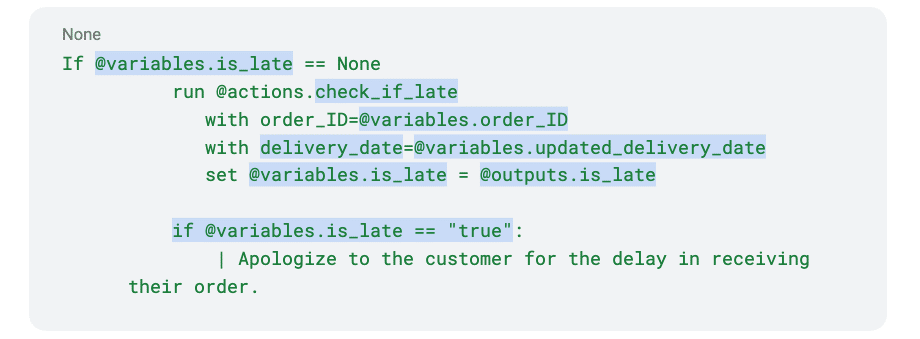
That’s the power of Agent Script. It helps you build reliable, context-aware agents that get your business processes right every time.
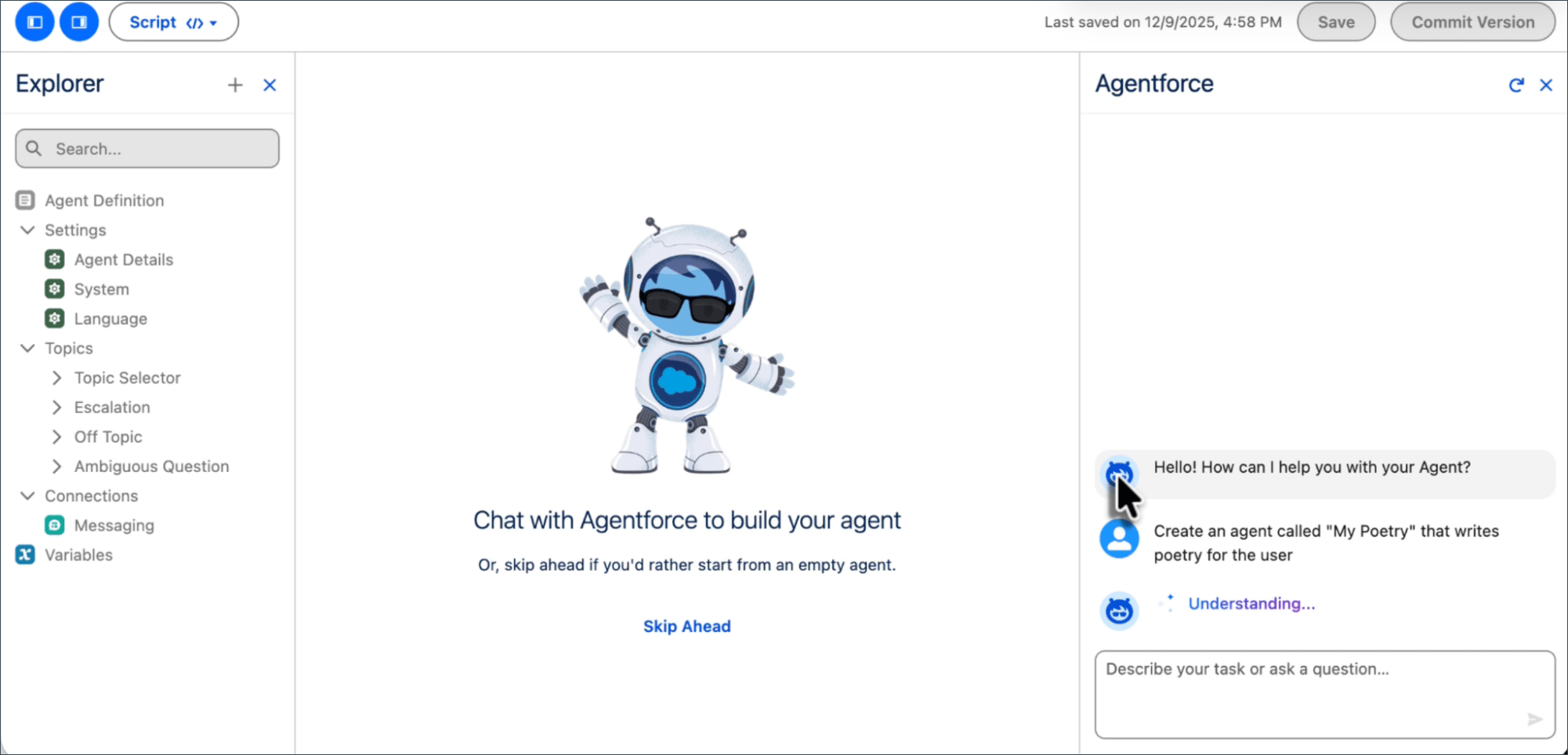
In the right-hand corner of the below image, notice that your AI assistant is still there to help you update and improve your agent. On the other side, you’ll see some things that should look familiar: topics and actions.
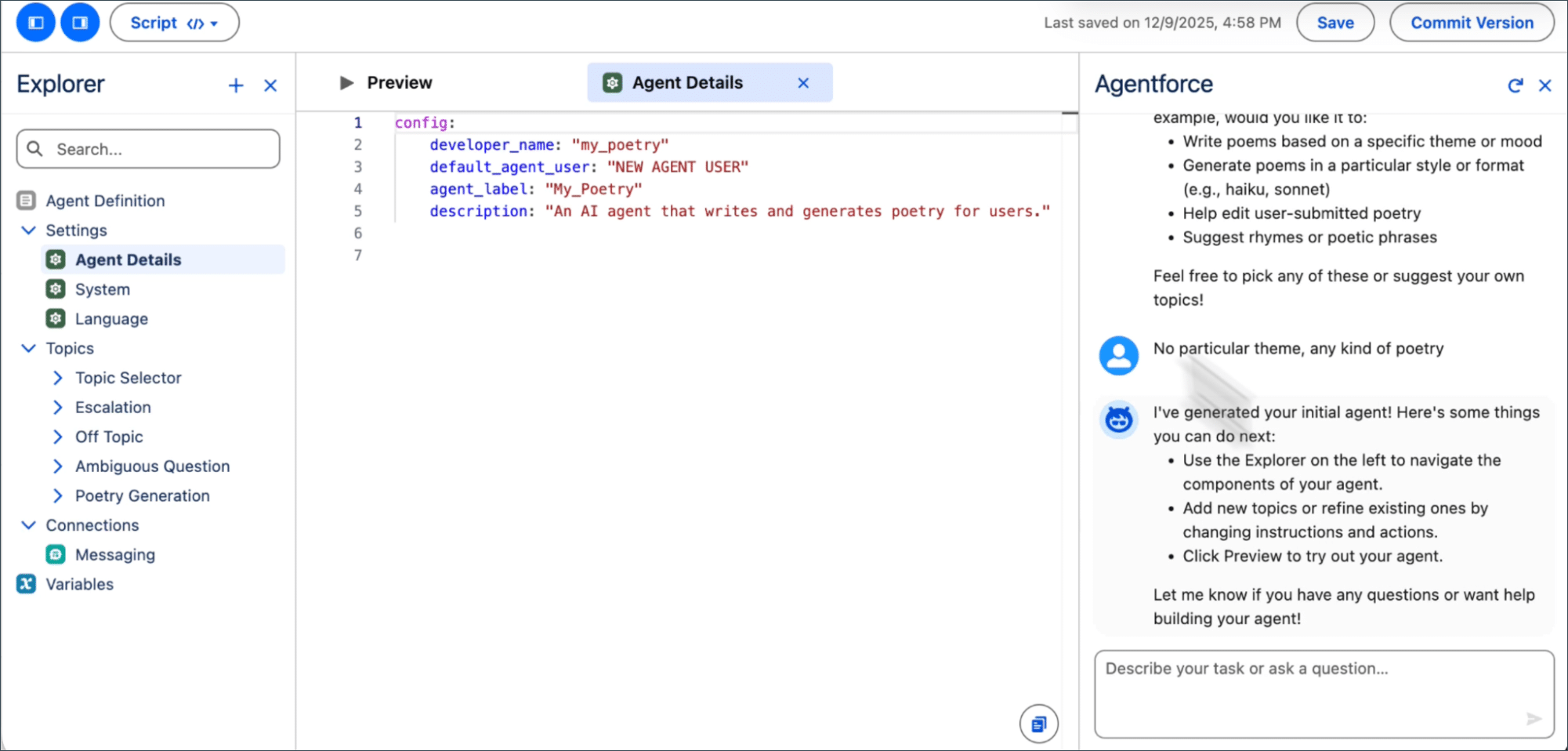
These play the same roles they did before, except now they’re powered via Agent Script.
Does Agent Script require coding skills?
No. Agent Script is a human-friendly, high-level scripting language that’s designed to be easy to read. So even if you’re not comfortable with code, you can still get a sense of how an agent works from the raw script. Plus, the new Agentforce Builder gives you several ways to build agents with Agent Script.
Canvas view
When you create an agent, it opens in Canvas view in Agentforce Builder. The Canvas view simplifies the agent configuration experience. It summarizes Agent Script into easily understandable blocks, which you can expand to view the underlying script. Plus, Canvas view provides quick action shortcuts to help you build and edit your agent efficiently. Type “/” to add expressions for common patterns (for example, if-else conditionals) and “@” to add resources (for example, topics, actions, and variables). Learn more in Building Agents in Canvas View.
Script view
In Script view, you can see what’s happening “under the hood” and write Agent Script directly, if you’re comfortable with a code editor interface. It’s a great way to make fast, precise changes and dig deep into error messages. (Bonus: It makes it easier to reuse elements of your agent—simply copy and paste the script!) Learn more in Get Started with Agent Script.
Whether you use Canvas or Script view to build your agent, your agent’s configuration and any edits you make are consistent across both views. Here’s an example.
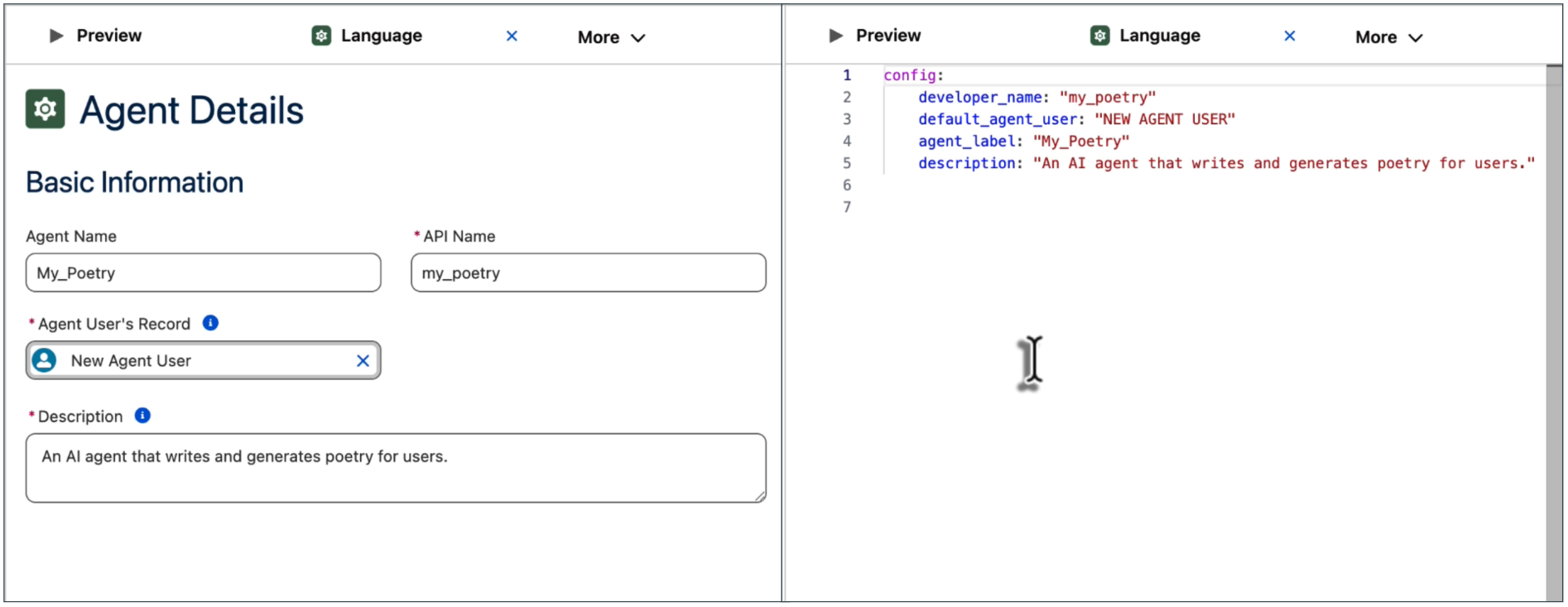
With the integrated assistant panel, Agentforce is always available to help, no matter which view you choose. Simply tell Agentforce what you want your agent to be able to do. Agentforce converts your request into suggested topics, actions, and instructions, which you can then accept or decline—keeping you in control. You can also use the assistant to ask questions, such as how to resolve a specific error or what a particular block of script does.
Preview what your agent is thinking
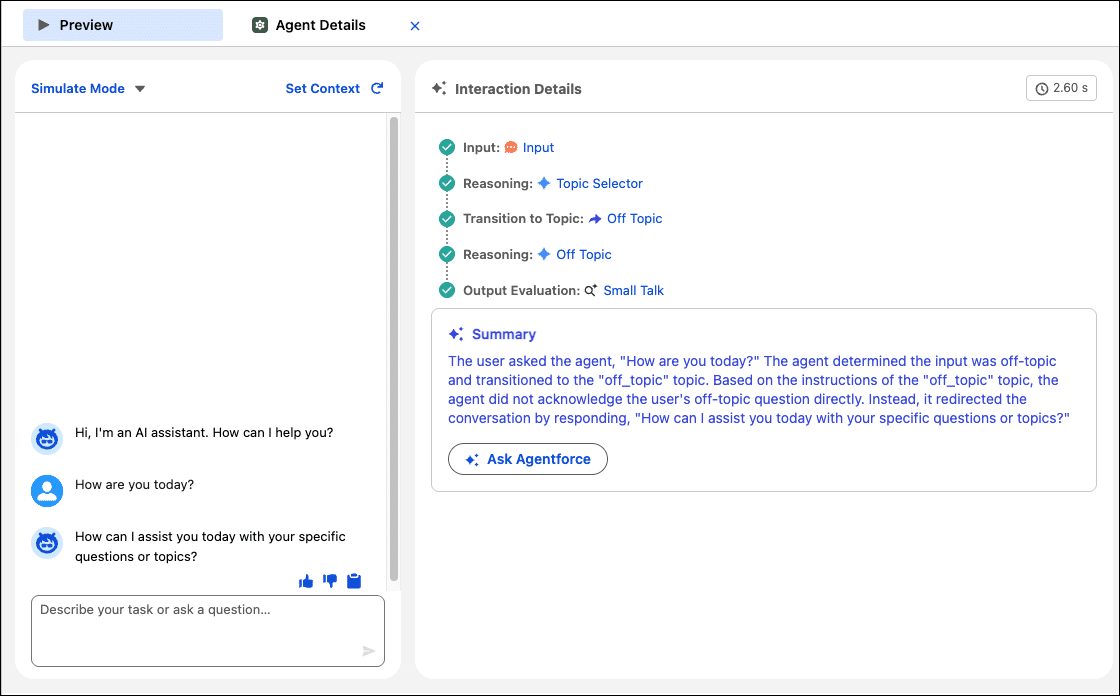
The new Agentforce Builder also provides a whole new level of insight into how the agent processes its reasoning via Agent Previews. With Previews, you can use mock data (so that your org won’t be affected) to set specific conditions and simulate the conversation. You’ll get the behind-the-scenes interaction summary of what it’s thinking.
What happens to the “classic” builder?
Currently, there’s no date to sunset the original builder. You can use both tools side by side without an issue. Your current agents will still work as they do today. We hope to create a tool to port classic agents to the new engine, but that’s still in the planning stage. Stay tuned as we provide more details in the future.
Where can I find the new Agentforce Builder?
Unlike the original builder, which is in Setup, the next generation of tools is in the new Agentforce Studio app. This means you can empower users across your business to build, test, and monitor agents, not just users with access to Setup. To find the new builder, from the App Launcher, search for and select Agentforce Studio, and then select Agents. It’s currently available to all customers and also included in Developer Edition orgs.
The new Agentforce Builder isn’t just a new interface. It empowers admins to better design, trust, and manage AI-powered experiences. With clearer logic through Agent Script, built-in AI assistance, and more transparent decision-making, admins gain greater confidence in how agents behave. Explore our resources to learn more.
Resources